 Troop Campfire
Each member controls their own notification preferences from Account Settings → Notifications. Campfire has three notification toggles.
How to adjust notification preferences
- Open troopcampfire.app or the Campfire mobile app.
- Tap Account Settings (top right of the app).
- Open the Notifications tab.
- Toggle on or off:
- Message Notifications — new messages and mentions.
- Event Notifications — event updates and reminders.
- Weekly Digest Email — a weekly email with upcoming events, advancement, and family balance — whatever your unit includes.
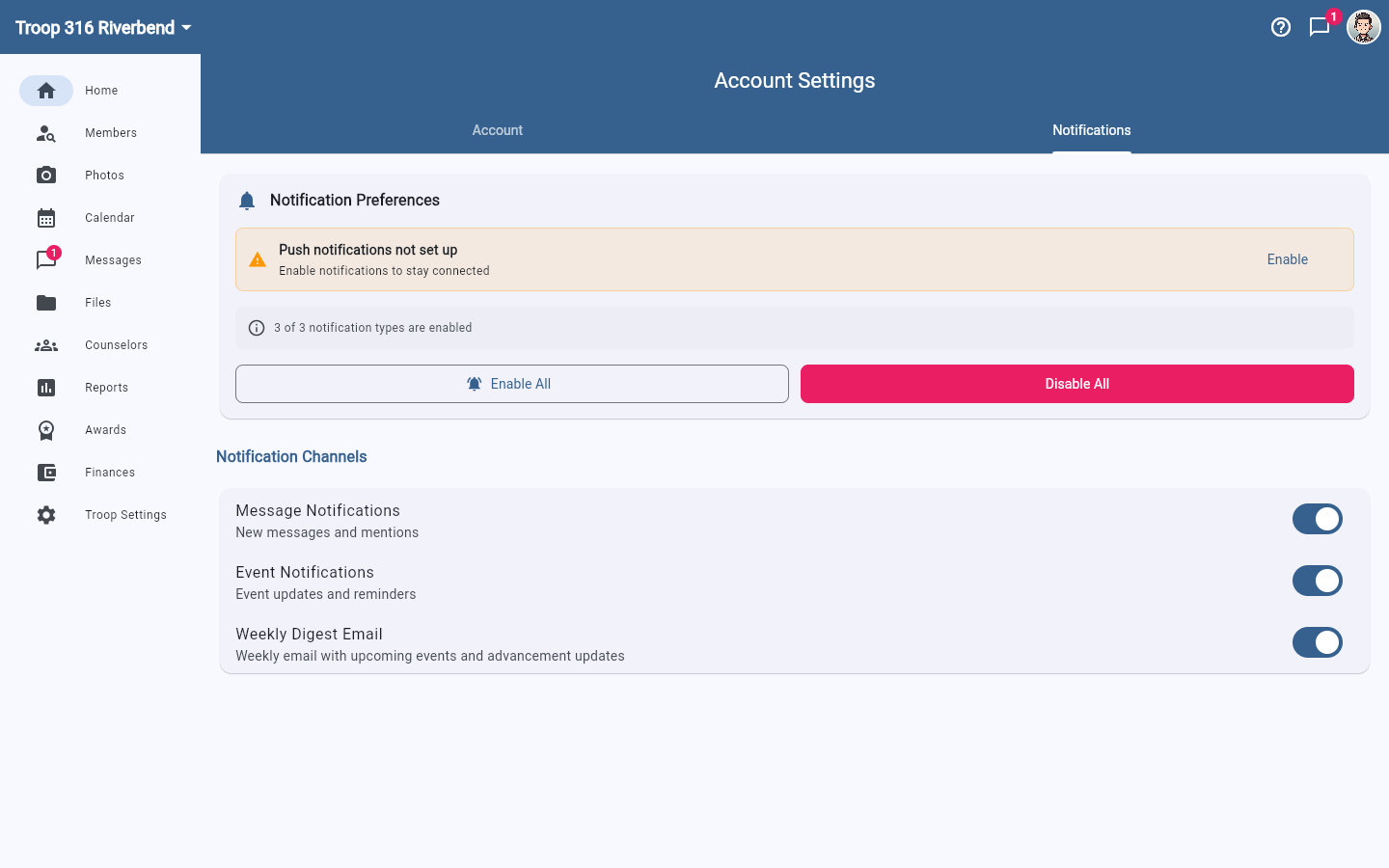
Enable All and Disable All at the top of the page flip all three at once, and the summary line above them tells you how many are currently on.
Turn on push notifications first
If you see a Push notifications not set up banner at the top of this page (or above your chat list), tap Enable on it. Until you do, the toggles below only control email — no push will arrive on this device.
Push delivery depends on device settings too
Push delivery also depends on your phone's system-level notification settings being enabled for Campfire. If you turned off notifications when you first installed the app, go to your phone's Settings → Notifications → Campfire and re-enable them there.